



TL;DR
- Context. Waste is a stock movement. Expired, spoiled or leftover stock has to leave the ERP to the right place, or stock and cost reports are wrong. Some brands' expired goods also have to be returned to the brand partner or to the central hub.
- Problem. Outlets logged waste in Airtable, or an ops admin typed it straight into a modified Odoo. That meant two sources, re-typing, no photo proof, no limits on quantity, and return documents made by hand.
- What I designed. A category-first mobile flow with quantity limits and photo evidence, configuration pages where supervisors set the rules, an admin portal with photo galleries and safe exports, and, in the biggest change, return rules that create return documents automatically instead of asking crews to pick a return category.
- Outcome. 20+ outlets moved off Airtable and Odoo Outlet. Every waste line now has a photo, recording one entry takes ~3 minutes instead of ~8, and the system creates return documents itself instead of someone making them by hand.
Context
In a cloud kitchen, stock leaves the shelf without being sold for many reasons. Each one has to land in a different place in the ERP:
| What the crew threw away | Where it goes in Odoo |
|---|---|
| Expired | Virtual Locations / Waste / Brand Partner Expired |
| Spoiled | Virtual Locations / Waste / Spoiled |
| Leftover prep (WIP, Sisa Preparation) | Virtual Locations / Waste |
| Central-kitchen handling waste (Waste CK Handling) | Virtual Locations / Waste |
| Operational (Operasional) | Virtual Locations / Waste |
| Damaged goods / damaged packaging | Virtual Locations / Waste / Disposal |
| Return to the central hub (v1) | Transit – Hub Kemang |
| Return to the brand partner (v1) | Partner Locations / Customers |
Some brands are brand partners (BP): their expired stock goes back to the partner or to Hub Kemang, the central hub, and doesn't simply get thrown away.
The problem
Before:
- Yummykitchen outlets logged waste in Airtable
- Other outlets had an ops admin enter waste directly in Odoo Outlet
That caused:
- Two sources of truth, re-typed by hand
- No proof: no photo, so no way to check or dispute
- No limits: a "5000" typed instead of "5" went straight into the books
- Units chosen by hand: pcs vs pack vs gram
- Returns done manually: someone had to know which brands needed a return document and make it
PRD goal: "Input waste directly into the system without touching the ERP." That meant removing Odoo Outlet, moving to Odoo Core through the middleware, and giving supervisors a portal to see the waste documents.
Users
| Role | Surface | Job |
|---|---|---|
| Outlet crew | Mobile app in Lark | Records what was thrown away, with a photo |
| Supervisors | Configuration | Decide which products can be wasted in each category, the quantity limits and the return rules |
| Inventory Control | Admin portal | Views, filters and exports waste and return documents |
| Finance / Cost Control | Tableau | Reads waste data every day |
How the system works
| Stage | What happens |
|---|---|
| Configuration | Supervisors set the products allowed in each category, a quantity limit per unit, and a return rule per brand |
| Mobile app | Crew picks a category, searches products, enters the quantity, adds a photo and submits |
| Admin portal | Waste documents (and return documents), split by category |
| Every day at 00:00 | Tableau and a bot (RPA) push the documents to Odoo Core: stock moves and SOH updates |
Key design decisions
D1. Category first, because the category decides the form
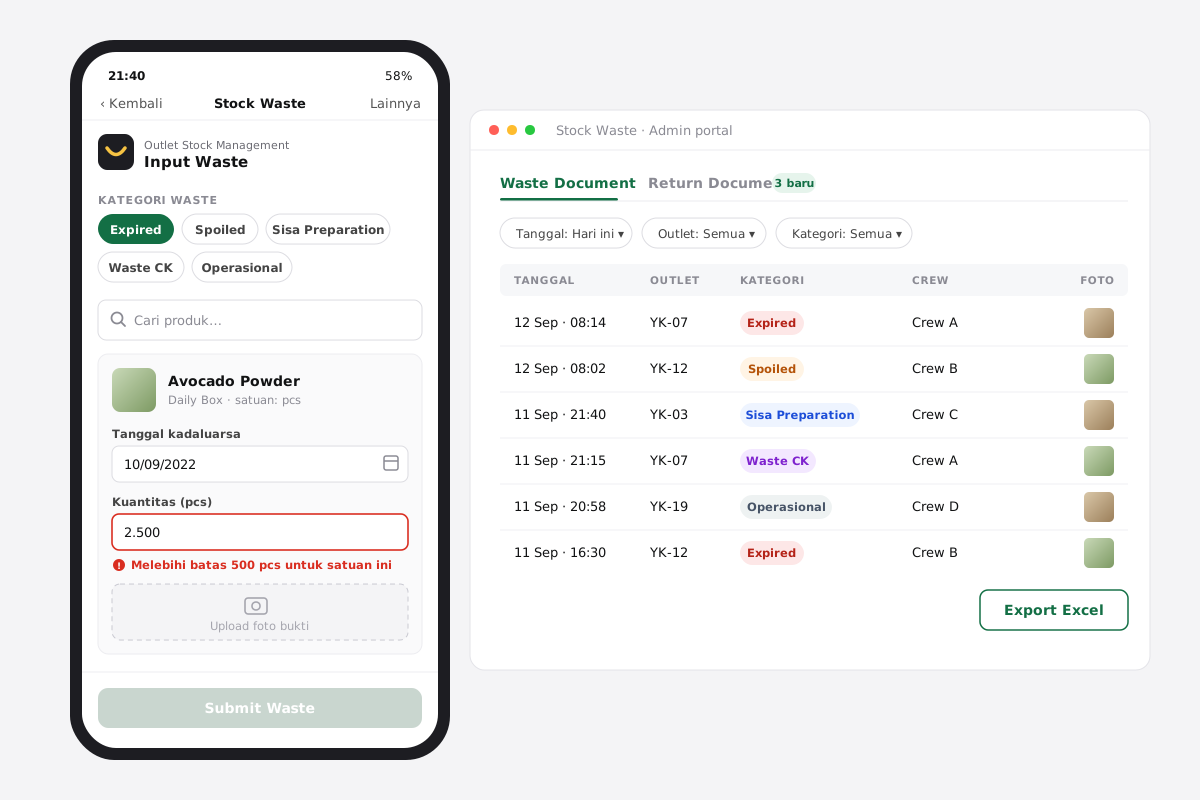
Crews pick what kind of waste before anything else, because the category changes which fields appear:
- Expired: product, expiry date, quantity, photo
- Spoiled / leftover prep / central-kitchen waste: product, quantity, photo. The expiry date is hidden.
Hiding expiry dates where they mean nothing removed a field that crews had been filling with made-up dates.
D2. Product search scoped to the category
Supervisors choose which products can be wasted in each category (including recipe items for leftover prep). In the app, search only returns those products. Crews can't, for example, record a sealed packaging item as "leftover prep".
D3. Limits set per unit, not per product
Supervisors set a maximum quantity per smallest unit (gr, pcs, ml…). If a crew member goes over it:
- A warning appears under the field
- They can't continue, and the photo upload stays disabled
Why per unit and not per product? There are hundreds of products but only a handful of units. Supervisors maintain a short table instead of a long one that would go stale. Trade-off: it's coarse. 2,000 g is plausible for rice and absurd for saffron (see Reflection).
D4. The unit is chosen for you
The system matches each product to its reference (smallest) unit, so crews never pick a unit and quantities add up correctly.
D5. A photo is the receipt
Every line needs a photo. In the admin portal the first photo appears as a thumbnail on the row, and tapping it opens a gallery of everything the crew uploaded. The photo discourages misuse and settles disputes with brand partners over expired returns.
D6. Think like a crew member, book like an accountant
Crews think in terms of "what did I throw away". The ledger cares about "where does it go". One submission is split automatically into one document per category and destination, so crews never deal with Odoo locations.
D7. The biggest change: a return isn't a category, it's a rule
v1 gave crews two extra categories to choose from: Return to Hub Kemang and Return to BP.
What went wrong: crews had to remember each brand's return agreement. Choosing wrong sent stock to the wrong place in the books and broke the return to the partner.
v2 (Phase 3):
- Removed both return categories from the app, the portal and the configuration
- Added a Return Waste configuration: for each brand, Return to BP or Return to Hub Kemang, active or inactive, with import and export
- When crews submit Expired waste for a brand that has a return rule, the system creates the return document automatically (Waste → Transit – Hub Kemang, or → Brand Partner)
- The admin portal got two tabs: Waste Document and Return Document
The decision moved from every crew member at every outlet to a few supervisors setting it once. Crews now pick from five categories, all of which describe what happened, not what the contract says.
D8. Exports that can't bring the portal down
Clicking Export with no filter shows "Data terlalu banyak" ("too much data") with Filter / Batal (cancel), which steers people to narrow the date range or outlet first. You can also export from a single document's page.
D9. Configuration edits that are safe to back out of
- Tree checklist: checking a category selects all of its products
- Cancel with a choice: Hapus perubahan (discard changes) vs Tetap pilih produk (keep selecting), so a misclick doesn't wipe a long selection
- Delete mode behind the ⋯ menu, with checkboxes and a confirmation step, kept away from the main actions
- Import checks with plain messages: duplicates ("Data telah dimasukkan. Silahkan upload data yang baru": "this data already exists, please upload new data"), wrong template, failed upload ("Impor data gagal. Silahkan coba lagi": "import failed, please try again")
D10. Empty and error states that tell you what to do
When a filter finds nothing: "Data tidak ditemukan. Harap periksa kembali detail yang dimasukkan." ("no data found, please check the details you entered"). The same message is used in every module (see the Portal case study).
Screens
Rollout
| Phase | What shipped |
|---|---|
| Phase 1 | Configuration (products per category, unit limits), mobile app, admin portal, unit mapping in the middleware |
| Enhancement | New categories: Sisa Preparation, Waste CK Handling, Operasional. Expiry date hidden for non-expired categories. Products synced per category |
| Phase 2 | Filter, search and export in the admin portal, plus export from a document's page |
| Phase 3 | Search and export in configuration. Return categories removed. Return Waste configuration and a Return Document tab |
| Next (roadmap) | AutoWaste: shelf-life configuration (one per product, up to 365 days) so predictable expiry waste no longer needs typing in |
Impact
| Metric | Before | After |
|---|---|---|
| Where waste was recorded | Airtable + Odoo Outlet | One app across 20+ outlets |
| Time to record one waste entry | ~8 min | ~3 min |
| Waste lines with photo proof | rarely | 100% (required) |
| Quantity corrections requested by IC | baseline | −72% |
| Return documents made by hand | ~35 a week | 0, created from return rules |
| Categories crews choose from | 6 (2 depend on contracts) | 5 (all describe what happened) |
| Waste data for finance | weekly recap | Daily in Tableau (00:00) |
Reflection
- The best decision was taking a choice away. Removing the return categories made the app simpler and the data more accurate.
- What I'd change:
- Limits per unit are too blunt. I'd add per-category or per-product overrides for high-value items.
- Offline drafts. Waste often gets recorded in the storeroom, where the signal is worst.
- Waste reasons inside each category (dropped, wrong temperature, over-prepped) so the data explains why, not just how much.
KhoirulAuthor
Thanks for reading — happy to walk you through the decisions on a call.