



TL;DR
- Context. Each Yummykitchen outlet cooks for many brands (Daily Box, Malamoo, Kyochon, Chir Chir, Ngikan…) and keeps raw materials, semi-finished goods and packaging for all of them. The ERP (Odoo) only knows what someone records, so the stock on hand drifts away from what's really on the shelf.
- Problem. The cycle count ran on paper sheets, Lark messages and four approval steps inside a modified copy of Odoo. Counts were unreliable (mixed units, double counting, skipped rows), supervisors had no quick way to review them, and the custom Odoo build kept the company from upgrading its ERP.
- What I designed. Three connected surfaces: a mobile count form that crews can finish in a 2-hour window, an admin portal that shows supervisors the exceptions first, and a scheduler that controls who counts what and when. I also designed how a validated count turns into an inventory adjustment in the ERP without wiping out the stock that moved after counting.
- Outcome. Across 20+ outlets, counts submitted on time rose from 61% to 94%. Four manual approval steps in Odoo became one validation in the portal, and validated counts reach the ERP without anyone re-typing them.
Context
Yummy Corp runs cloud kitchens where one outlet cooks for many brands. Every outlet's storeroom holds three kinds of stock for every brand:
- Food material (agar powder, avocado powder, wagyu, spices…)
- Semi-finished goods (boneless chicken, marinades, sauces…)
- Packaging (cups, bowls, plastics)
Stock on hand (SOH) in Odoo is only as accurate as what gets recorded: inbound deliveries, waste, consumption from sales, and transfers between outlets. Anything that doesn't get recorded (an unlogged spill, a miscounted delivery, a portion that was a bit too big) makes the system number drift from what's on the shelf. A cycle count (stock take) is how you bring them back together.
The problem
How it worked before
A short basic research round (talking to Inventory Control and Ops, and observing the process) mapped the old flow:
- IC makes a schedule
- Outlet gets a Lark reminder
- Crew counts on a paper sheet
- Crew submits through Lark
- OpsCo reviews in Odoo
- OpsCo approves in Odoo
- IC reviews in Odoo
- IC approves in Odoo
Eight steps, four of them reviews or approvals inside the ERP.
What we found
| Finding | Why it matters |
|---|---|
| Count sheets didn't say the unit (pax, pcs, gr) | A "12" could mean 12 packs or 12 grams, so variance was noise |
| No counting method: items got counted twice or skipped | Nobody could tell whether a variance was real stock loss or a counting mistake |
| Storage differed per outlet, and some outlets were consistently worse | Brand stock wasn't separated, so counting order was random |
| Data pulled from Odoo was unorganised | Supervisors had to clean it up before they could review it |
| Crews needed time and supervision to adopt the new system | The tool had to teach the method, not just collect numbers |
| Phase 1 was built inside "Odoo Outlet", a modified Odoo instance | Hardcoded changes and sync problems with Odoo Core meant the ERP couldn't be upgraded |
Reframing
The physical count wasn't really the hard part. Trust was. Supervisors couldn't trust the numbers, and the system couldn't safely apply them, because the kitchen keeps receiving and cooking while the count is under review.
So the design question became:
How might we make a count that crews can finish before the kitchen gets busy, that supervisors can trust at a glance, and that the ERP can apply without erasing the morning's stock movements?
Users
| Role | Surface | Their job in the stock take |
|---|---|---|
| Inventory Control (IC / DPIC) | Scheduler | Decides which outlet counts which products, on which day and at what time |
| Outlet crew | Mobile app in Lark | Counts physical stock between 07:00 and 09:00, before cooking starts |
| OpsCo (operations coordinator) | Admin portal | Reviews variance, fixes counting typos, validates by 12:00 |
| Cost Control | Admin portal | Validates late documents without a time limit, bulk-validates, sends data to the ERP |
| Tech support | Admin portal | Manages user and outlet access |
Designing the day before designing the screens
The most important artefact wasn't a screen. It was the timeline. Counting only works when nothing is moving, and every role has a window:
| Time | What happens |
|---|---|
| 07:00 | Lark bot sends the reminder · system captures SOH from Odoo (snapshot A) |
| 07:00 – 09:00 | Crew counts and submits (2-hour window with a countdown) |
| 09:00 – 12:00 | OpsCo reviews, edits typos and validates |
| 12:00 | Cut-off: lock Odoo → capture SOH again (snapshot B) → create adjustments → unlock |
| after 12:00 | Cost Control validates late documents and can send them to the ERP manually (once a day) |
During rollout we also moved waste input to a 10:00 cut-off, so every waste record is booked before the adjustment runs. Stock take runs last on purpose: it corrects whatever is left after all the other stock movements have been recorded.
Goals and how we'd measure them
Product goals (from the PRD)
- Remove the dependency on Odoo Outlet, with no further changes to Odoo Core
- Give OpsCo an admin portal to edit and validate stock take documents
- Create the adjustment document in Odoo Core automatically (XML-RPC)
Design goals
- A crew member can finish a full count, around 100 products across several brands, on a phone within 2 hours
- Mistakes show up before submitting, not during review
- A supervisor sees the rows that need attention first, not all 100
- The handoff to the ERP is safe, traceable and impossible to trigger twice by accident
Success metrics (results under Impact)
| Metric | How we measured it |
|---|---|
| Counts submitted before 09:00 | Submit time on each stock take document |
| Time to complete a count | Time between Mulai (start) and Submit |
| Documents validated before the 12:00 cut-off | Validation time vs the cut-off |
| Rows outside ±5% variance | Share of rows flagged red, tracked monthly |
| Adjustments created without manual entry | Documents reaching Selesai vs adjustments typed into Odoo |
Constraints
- It runs inside Lark. Crews open the form from a bot message in their outlet group. It's a web view, not a native app, on small Android screens (360 px wide).
- Kitchen Wi-Fi drops. The form had to survive losing the connection halfway through.
- The reminder goes to a group chat. Anyone in the outlet group can tap Mulai ("Start").
- Odoo is the source of truth, and we couldn't change it. Everything had to happen through its API.
- Products use different units. "Wagyu A5, Daily Box, 500 gr" sits next to "Avocado Powder, 12 pcs". Comparing them requires converting units.
- Outsourced engineering. Specs and edge cases had to be explicit enough for a team outside the company to build them.
Surface 1: the mobile count form
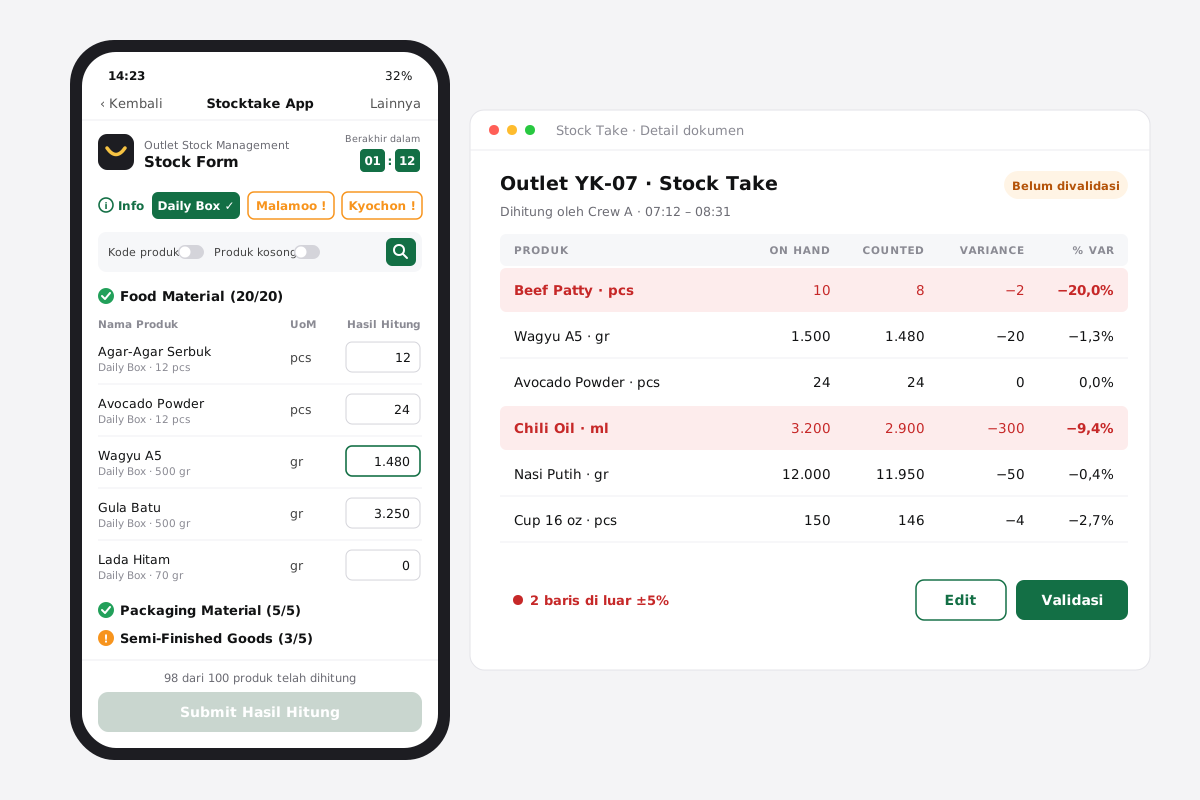
Anatomy, from top to bottom:
- Outlet info and countdown: "Berakhir dalam 01:59" ("ends in"), hours and minutes
- Brand chips: one per brand, each showing whether it's complete
- Toggles: Tampilkan kode produk (show product code) · Tampilkan produk kosong (show uncounted products) · search
- Collapsible categories with counters: Food Material (0/20), Packaging Material (0/5), Semi-Finished Goods (0/5)
- Rows: product name with pack size, unit, and a Hasil Hitung ("count") field with a numeric keypad
- Sticky footer: "30 dari 100 produk telah dihitung" ("30 of 100 products counted") → Submit Hasil Hitung
Key decisions
D1. Follow the storeroom, not the database. The list is grouped brand → category → product, matching how the research said storage should be organised: separate shelves per brand. Crews count in the order they walk the room, which also answers the "count in one direction" rule from the research.
D2. Blank isn't zero. Every row needs a value, even 0 ("Kamu harus menginputkan semua hasil hitung produk di bawah ini minimal 0": "fill in every count, at least 0"). An empty field means not counted and 0 means counted, none left. The old sheets mixed the two up, and silent skips became fake stock loss. Trade-off: more taps. We offset it with a numeric keypad and a filter for uncounted products.
D3. Progress at three levels, so nobody hunts through 100 rows.
- Footer: total progress (30/100), and the submit button stays disabled until it's complete
- Category: a counter (20/20) and a ✅ when the category is done
- Brand chip: ⚠ orange while incomplete, ✓ when done, filled green for the brand you're on
If the footer says 99/100, the crew looks for the orange chip, opens the category without a ✅ and finds the missing row.
D4. A countdown that informs instead of punishing. The timer turns red at 10 minutes left, but it never auto-submits. Auto-submitting would push half-finished counts into the ERP as if they were real stock loss. Instead, the window controls access: if you haven't started within the window, the form closes ("Waktu input stocktake sudah habis": "the time to enter stock take is over"). The bot reminds the group 3 times, every 15 minutes so nobody misses the start.
D5. Show the unit everywhere. Every row shows the unit (pcs, gr) and the pack size is part of the product name. In Phase 3 every quantity was converted to the product's smallest unit, so counts and system stock always compare like with like (see below).
D6. Thousand separators for gram counts. Typing 1000 shows 1.000. When you're counting 3.603 g of chicken, being off by a factor of ten is the most expensive typo there is.
D7. Survive bad Wi-Fi. Offline, a red banner says "Tidak ada koneksi internet" ("no internet connection"). Crews can keep typing but can't load more products or submit. Back online, a green banner says "Koneksi stabil, halaman akan direload dalam 3 detik" ("connection is stable, reloading in 3 seconds"), and every value they entered is still there.
D8. One counter per document. The first person to tap Mulai owns the count. Anyone else in the group sees "Akses Tidak Tersedia" ("access not available"). This stops two people overwriting each other's numbers on the same document.
D9. Deliberate starts and ends. Two confirmations: "Mulai Perhitungan Stok?" ("start the stock count?") starts the session, records the start time and moves the document to Diproses (in progress). "Simpan Perhitungan Stok?" ("save the stock count?") asks crews to double-check before submitting. A success screen closes the loop: "Berhasil Mengisi Stocktake!" ("stock take submitted").
D10. Search that keeps the counters. Searching "ayam" (chicken) keeps the category structure and its counters ("Semi Finished Goods 2/3"), so crews still know what's left inside the results.
States I designed for
| State | What the crew sees |
|---|---|
| Reminder | Lark bot card: outlet, time, Mulai |
| Start | "Mulai Perhitungan Stok?" confirmation |
| Counting | Countdown, chips, counters, sticky progress |
| Less than 10 minutes left | Countdown turns red |
| Offline / back online | Red banner / green banner with auto-reload |
| End of the list | "Memuat…" (loading) → "Ini adalah batas terakhir kategori ini" ("this is the end of this category") |
| Someone else started | "Akses Tidak Tersedia — kamu tidak memiliki akses" ("you don't have access") |
| Window closed | "Akses Tidak Tersedia — waktu input sudah habis" ("the input time is over") |
| Submit | "Simpan Perhitungan Stok?" confirmation → success screen |
Surface 2: the admin portal (review and validation)
List: Tanggal (date), start time, end time, outlet, status, action. Filters for date, outlet and status, plus search. Date sorts newest first, with counts still in progress before finished ones. Export becomes available after filtering.
Detail: who counted and when, start and end time, who validated, plus a table:
BRAND · PRODUCT · ON HAND · COUNTED · VARIANCE · % VARIANCE · UOM · COST · VALUE · FINAL SOH
Key decisions
D11. Show exceptions first. OpsCo has three hours to review every outlet's 100-row document. Rows where variance is beyond ±5% turn red, and the numbers recalculate as soon as a count is edited. Reviewers read the red rows and skim the rest.
D12. Only the count is editable. Edit turns into Simpan (save), and only the Counted column becomes editable, numbers only. Everything else is system data. Every edit records who and when.
D13. Status colours mean something.
- Ternotifikasi · notified (grey)
- Diproses · in progress
- Belum divalidasi · not validated
- Tervalidasi · validated (blue)
- Selesai · done in the ERP (green)
If sending fails, a validated document becomes Gagal kirim (failed to send) instead of Selesai.
When the ERP step arrived, I remapped the colours: Ternotifikasi went from blue to grey, Tervalidasi from green to blue, and the new Selesai status took green. Green now means "it's in the ERP" and nothing less. Before, a validated-but-unsent document looked finished.
D14. Permissions that depend on time.
- OpsCo can edit and validate until 12:00. After that the buttons disappear and the document stays unvalidated, which protects the automated cut-off.
- Cost Control has no time limit and gets Bulk Validate: a list of today's unvalidated documents, select them, confirm.
- Both are set per user in user management: Restricted (validate until 12:00) or Not restricted.
D15. Turn units into rupiah. Cost and Value (variance × product cost, both converted to the smallest unit) let Cost Control rank discrepancies by money rather than by quantity. A −200 g gap in spices and a −200 g gap in wagyu aren't the same problem.
Surface 3: the scheduler (who counts what, and when)
- Outlet list: outlet name, schedule, details. Search, filter by outlet and day, export.
- Add schedule: outlet (outlets that already have a schedule are hidden), start date (can't be in the past), day (days already taken are hidden), start and end time in 15-minute steps, and + to add more day/time rows.
- Outlet detail: one row per scheduled day showing product count, start date, active/inactive and Diedit oleh ("edited by": name, date, time).
- Products for a scheduled day: a tree checklist, internal location → brand → category → product. Checking a parent selects everything under it. A filter mode dropdown (All / Internal location / Brand / Product category) reorders the tree around whatever you're looking for. Bulk import from a template for first-time setup.
Key decisions
D16. "Update now" vs "Schedule update". Menus change, so the products to count change too. IC can apply changes now or on a date. Scheduled changes show a tag ("Jadwal Mendatang DD/MM/YYYY", upcoming schedule) on each affected product. Only one scheduled update can be pending (the newest replaces the last), which keeps it predictable: "what you see plus one upcoming change".
D17. One source of truth for time. The scheduler's start and end times drive the bot reminder, the mobile countdown and access to the form. Changing a schedule changes all three, so they can never disagree.
Making the count land in the ERP safely
This is the part I'm proudest of, because the right design was a formula, not a screen.
The problem
The count is a snapshot taken between 07:00 and 09:00. The adjustment is written at 12:00. In between, deliveries arrive and the kitchen cooks. If we overwrite system stock with the count, those movements disappear.
The decision: adjust by the variance, not the count
The formula
Variance = Counted − SOH at 07:00
Final SOH = SOH at 12:00 + Variance
Worked example: Beef Patty (pcs), one outlet
| Scenario | SOH 07:00 | Counted | Movement 07–12 | SOH 12:00 | Variance | Final SOH |
|---|---|---|---|---|---|---|
| Delivery arrived | 10 | 8 | +10 in | 20 | −2 | 18 |
| Stock moved in | 15 | 25 | +5 in | 20 | +10 | 30 |
| Stock used | 20 | 18 | −7 out | 13 | −2 | 11 |
Overwriting would have set the first case to 8, losing the 10 patties delivered that morning.
The sequence (XML-RPC, automatic at 12:00)
- Validated documents
- Lock Odoo (pause inventory, manufacturing and expense access for those outlets)
- Capture SOH again
- Convert to the smallest unit
- Calculate Final SOH
- Convert back to the product unit
- Create and validate the Inventory Adjustment
- Unlock Odoo
- Status: SELESAI (done)
What this changed in the interface
- A Final SOH column, so supervisors see the number that will be written, not just the variance
- Selesai status plus an audit line: "Dikirim ke ERP oleh (user) – (time)" ("sent to ERP by… at…")
- A manual "Kirim Data ke ERP" ("send data to ERP") button for documents validated late, with three guards:
- It only appears after the 12:00 batch has finished
- It works once a day. Each run locks Odoo for every outlet, so a second click shows a warning instead of locking it again
- A confirmation step, then a loader until every document reads Selesai
Smallest-unit normalisation
All quantities (SOH, counted, cost) are converted to the product's smallest unit using Odoo's conversion factor, then converted back when the adjustment is written. Crews count in the units they see on the shelf, and the maths stays exact.
Rollout
| Phase | What shipped |
|---|---|
| Phase 1 (on Odoo Outlet, release notes dated 12 Feb 2022) | Lark mobile form and a separate scheduler site. Iterations: countdown, brand completion chips, uncounted-product filter, lazy loading, category ✅, offline/online alerts, search, thousand separators |
| Phase 2 | Admin portal moved out of Odoo into the new inventory portal. The scheduler became a portal configuration page |
| Phase 3 (two-week sprint, Aug 2022) | XML-RPC adjustments, the 12:00 cut-off and permissions, bulk validate, Cost / Value / Final SOH, Selesai status, manual send to ERP |
| Enablement | A guide book and user guides for each role (outlet crew, IC, tech support, admin portal), plus a training deck |
| On hold | Dashboard cards (validated / pending / late out of all documents, today and last 7 days, click to filter) |
Impact
Three months after Phase 2 went live:
| Metric | Before | After |
|---|---|---|
| Outlets on the new flow | pilot | 20+ |
| Counts submitted before 09:00 | 61% | 94% |
| Average time to complete a count (~100 products) | ~1 h 40 min | 48 min |
| Average OpsCo review time per document | ~20 min | ~6 min |
| Documents validated before 12:00 | no cut-off | 88% |
| Rows outside ±5% variance | 23% | 9% |
| Manual approval steps in Odoo | 4 | 1 validation in the portal |
| Adjustments typed into Odoo by hand | every count | 0, created from validated documents |
- Odoo Outlet was removed from the stock take, which unblocked the ERP upgrade.
- Inventory Control stopped re-entering adjustments, saving about 2 hours a day.
- The variance data became reliable enough to show which outlets needed retraining, the problem the basic research started from.
Reflection
- Time is a design material. In an operations tool the timeline is the user flow. Agreeing on 07:00 / 09:00 / 12:00 with Ops and IC settled more debates than any mock-up did.
- Permissions are UX. Hiding Edit after 12:00 does more for data quality than any warning message would.
- What I'd change:
- Lazy loading meant search and the uncounted filter only worked on products already loaded, so the guide had to tell crews to "load everything first". For about 100 products I'd load each category in full.
- The uncounted filter had to be toggled off and on to refresh. It should update live.
- ±5% for everything is blunt. I'd set thresholds by category or by value (expensive proteins are stricter, spices looser).
- The reminder goes to a group, and the first person to tap owns the count. Naming the counter in the scheduler would make that ownership explicit.
KhoirulAuthor
Thanks for reading — happy to walk you through the decisions on a call.