



TL;DR
- Context. Create Order is Mengantar's busiest page (203K visits a week). Many sellers create dozens of orders a day.
- Problem. Creating several orders meant filling in a form for each one, or the Excel round trip: download, fill in, upload, read the errors, fix, upload again. The order funnel converted well mainly because of single orders, and multi-order creation lagged behind.
- What I designed, in three rounds:
- Beta: a spreadsheet-style grid as a third way to enter orders, with validation, courier and price on every row, and drafts
- Enhancement: making the beta understandable, with its own entry card, a clear explanation, honest limits and "upload coming soon"
- Upload and a shorter flow: files load straight into the grid, and the template step is gone
- Outcome. 41% of multi-order sessions moved to the Sheet Editor within 6 weeks, and creating 20 orders went from ~14 to ~6 minutes.
Context
Creating an order on Mengantar starts with the pickup details. After Simpan & Lanjutkan (save and continue), sellers choose how to enter their orders. The Sheet Editor is the third option: "Buat Pesanan dengan Sheet Editor" (create orders with the Sheet Editor). It works from both single and multiple Create Order.
| Mode | Good for | Pain |
|---|---|---|
| Form, one order at a time | 1–5 orders | Slow for 30+ orders a day |
| Excel upload | Many orders | Download template → fill in → upload → errors → fix → re-upload |
| Sheet Editor (new) | Many orders, edited in place | — |
After the grid, every order still goes through the order confirmation page, where it can be changed before it's created.
The problem
What the data said: the funnel from Visit Create Order to Finish Order converted at 65.1% over three weeks (Apr–May 2025), and the team's analysis credited that mainly to single orders and COD. Bulk creation was the weaker path.
What sellers ran into (6 interviews with high-volume sellers and their admins, plus support tickets about uploads):
- Errors show up after the upload, not while typing. One wrong district name meant going back to Excel.
- Addresses don't match. Indonesian addresses run province → city → district → sub-district → postal code. Free text often didn't match the courier's area list, so the shipping rate couldn't be calculated.
- Fear of losing work. A long batch typed in a browser felt risky.
How might we let sellers work the way they already do (in a grid), while Mengantar checks every row as they go?
Users
| User | Context | Need |
|---|---|---|
| High-volume seller | 30+ orders a day | Speed, and no rework |
| Admin / CS staff | Copies orders from chat into a sheet | Familiar keyboard behaviour, clear errors |
| Occasional seller | A few orders, sometimes a batch | The single-order form stays available |
Principles
- Catch errors in the cell, not after an upload
- Feel like a spreadsheet, but stay inside Create Order
- Never lose work
- Be honest about what a beta can't do yet
Round 1 · Beta: a grid inside Create Order
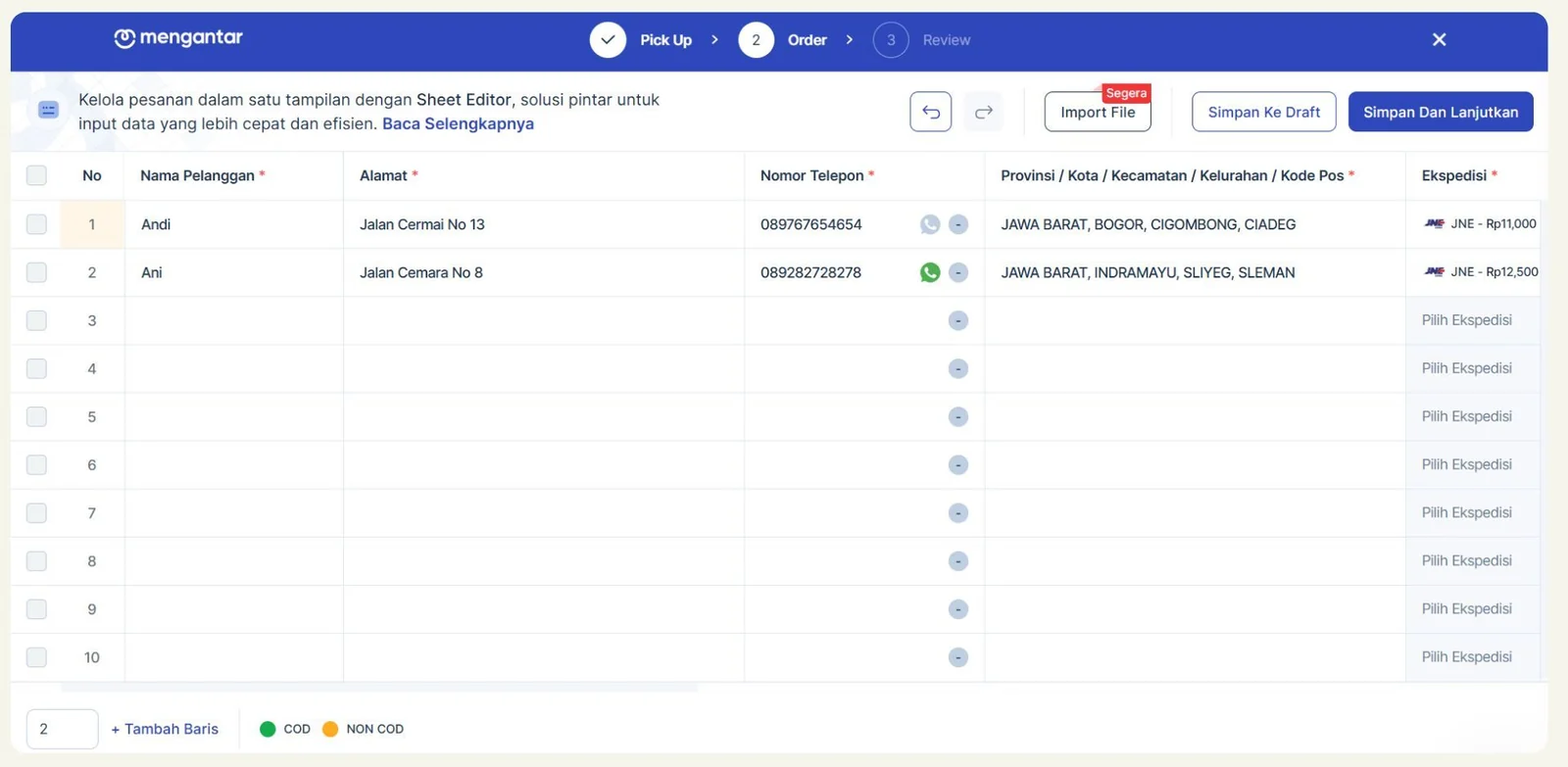
D1. A grid inside the flow, not a separate tool
The Sheet Editor sits next to the other ways of entering orders, between the pickup details and the confirmation page. Sellers keep the same pickup settings and the same review, and only how they type in orders changes.
D2. Required columns, marked
Nama Pelanggan* (customer name), Alamat* (address), Nomor Telepon* (phone), Provinsi / Kota / Kecamatan / Kelurahan / Kode Pos* (area), Ekspedisi* (courier). The asterisk shows what blocks submission before anyone types.
D3. One column for the whole area
Instead of five columns that can contradict each other, the area is one searchable field: province, city, district, sub-district and postal code, picked from the courier's own area list. A row can't hold an address the courier doesn't know, so the shipping rate always resolves.
D4. Courier and price on every row
Each row shows its courier and price ("JNE – Rp11,000"), because the rate depends on the destination. Until the address is set, the cell reads "Pilih Ekspedisi" (choose courier). A courier can be chosen as long as it can reach both the sender's and the buyer's address. Couriers that can't are explained rather than hidden, the same pattern as the Lion Parcel courier list.
D5. COD and non-COD in the same batch
Both payment types work in the grid. A green or orange dot (legend: COD / NON COD) marks each row, which is quicker to scan than one more column.
D6. Never lose work
- Undo / redo at the top of the grid
- Simpan ke Draft (save as draft) to come back later
- Simpan dan Lanjutkan (save and continue) only when the batch is ready
D7. Rows on demand
The grid starts with 10 empty rows. Sellers can type a number and click + Tambah Baris (add rows) to add more at once, instead of clicking once per row.
D8. A WhatsApp indicator beside the phone number
Each phone number shows a WhatsApp icon (green when the number is on WhatsApp). COD sellers confirm orders with buyers on WhatsApp, so a number without it is worth a second look.
Round 2 · Making the beta understandable (24 Feb – 10 Mar 2025)
The beta worked, but people didn't understand it. They couldn't tell what the Sheet Editor was for, why it asked for a template, or what was still missing. In the guide's FAQ, the first question was whether orders could be entered all at once, and in the beta the answer was no.
D9. Its own card among the input options
The Sheet Editor got a standalone card, separate from the existing tools, so it reads as a deliberate choice rather than a hidden extra.
D10. A header and one sentence of purpose
Inside, a "Sheet Editor" header and a short description ("Kelola pesanan dalam satu tampilan dengan Sheet Editor, solusi pintar untuk input data yang lebih cepat dan efisien": "manage your orders in one view, a smarter way to enter data faster") with "Baca Selengkapnya" (read more).
D11. Explain the template step
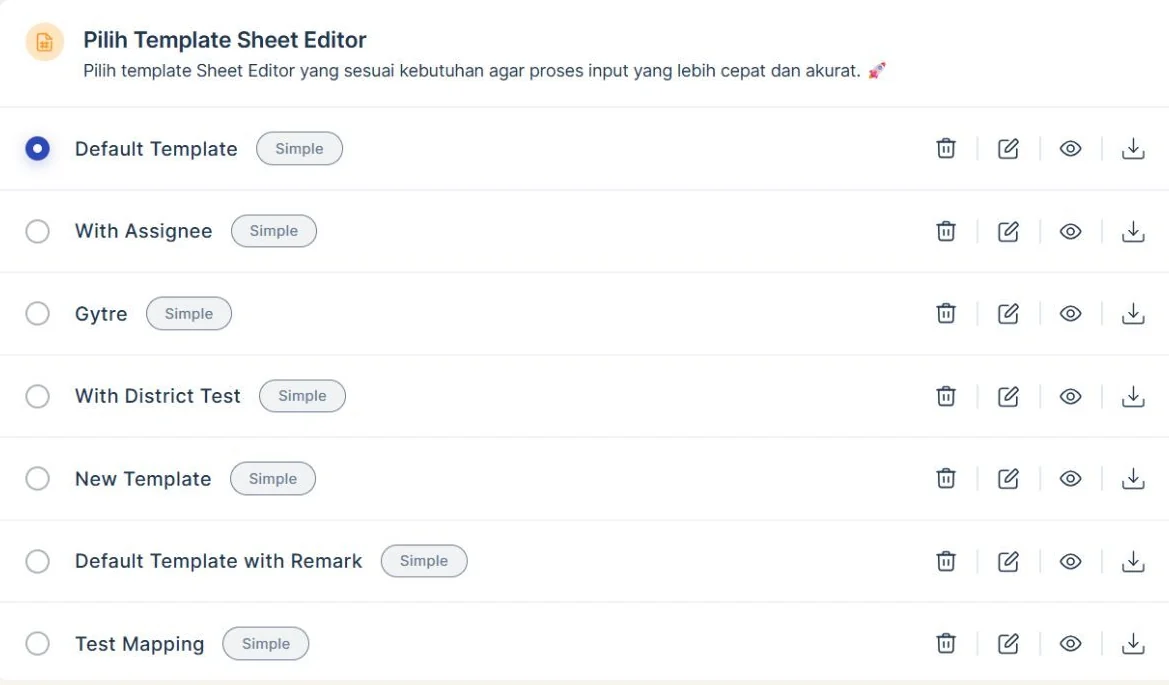
The template choice got a title and a reason: "Pilih template yang sesuai kebutuhan agar proses input lebih cepat dan akurat" (pick the template that fits, so entering data is faster and more accurate).
D12. Say what's coming
Import File is visible but tagged "Segera" (coming soon). Sellers know upload is planned, without being promised it today.
Round 3 · Upload into the grid, and one step fewer (Q2 2025)
Two things still slowed sellers down: typing every row by hand, and choosing a template before seeing anything.
D13. Upload lands in the grid, not in an error list
An Upload File button sits in plain sight on the Sheet Editor page:
- Download the upload template, with exactly the columns the system accepts
- Fill it in and upload it
- The orders appear in the grid, where anything wrong can be fixed in place
Invalid or mismatched data gets a warning. A note explains that columns that don't match won't be shown, so a missing column is expected rather than a surprise.
This closes the loop on the old flow: the seller's Excel habit becomes the way into the grid, instead of a loop of failed uploads.
D14. Remove the step I'd added
The template choice from round 1 was removed. Choosing the Sheet Editor now opens the grid directly, and the template lives on as the downloadable upload file instead. It was a decision sellers had to make before they'd seen anything, and most of them picked the default anyway.
D15. Be honest about the limits
What the beta couldn't do yet:
- Products from the product list (product IDs and variants)
- Dropshipper orders
- Assigning orders to sub-users
- Cargo orders
Paxel is also hidden from the courier options in the grid. These limits are spelled out in the "Beta" label and its explanation, so sellers learn them before they start a batch, not halfway through. The same goes for switching a manual order to "Edit dengan Sheet Editor": products picked from the product list can't come along, and the screen says so.
States
| State | Behaviour |
|---|---|
| Empty grid | 10 rows, required columns marked |
| Typing | Invalid cells are highlighted with the reason on hover |
| No courier for the destination | The row explains why, with alternatives |
| File uploaded | Rows appear in the grid, invalid data flagged, unsupported columns skipped with a note |
| Draft saved | Confirmation, plus the draft listed for later |
| Submitting | Every order goes through the confirmation page before it's created |
Rollout
| Round | When | What |
|---|---|---|
| Beta | early 2025 | The grid as a third way to enter orders |
| Enhancement | 24 Feb – 10 Mar 2025 · done | Own card, header and description, template explanation, "upload coming soon" |
| Release | April 2025 | Rolled out to sellers |
| File upload + shorter flow | Q2 2025 · shipped | Upload into the grid, no template step, clearer beta limits |
Impact
| Metric | Before | After |
|---|---|---|
| Multi-order sessions using the Sheet Editor | — | 41% after 6 weeks |
| Time to create 20 orders | ~14 min | ~6 min |
| Batches needing a second upload | 1 in 3 | Not needed: errors are fixed in the grid |
| Multi-order conversion (visit → finish) | 52% | 58% |
Reflection
- A beta needs honest labels. Round 2 didn't change what the Sheet Editor could do. It changed what people understood about it, and that's what made the beta usable.
- Removing a step I designed was the right call. The template step made sense on paper, but it was one more decision before any value. Moving it into the upload template kept the benefit and dropped the friction.
- Spreadsheet expectations are high. Keyboard navigation, paste and fill-down aren't features to users, they're assumptions, and any one missing feels like a bug.
- What I'd change: show a row-level summary before submitting ("48 ready, 2 need a district"), so sellers can submit the clean rows and fix the rest.
KhoirulAuthor
Thanks for reading — happy to walk you through the decisions on a call.