



TL;DR
- Context. Couriers pick parcels up from the seller's address before delivering them to buyers. A missed or late pickup delays the whole COD delivery.
- Problem. Addresses typed into a form were often inaccurate or confusing for couriers. They struggled to find pickup points, which led to late or failed pickups. Nothing helped sellers point to the exact spot.
- What I designed.
- Web: a pin on the map for every pickup address. Search, fine-tune, confirm, and the written address fills in from the pin, while manual entry stays available.
- Mobile: the same map in Create Order and My Addresses, plus a nudge to set a pin when the seller picks Lion Parcel.
- Outcome. 1,419 sellers got pickups based on their pin, and couriers reached 1,942 addresses using accurate geolocation.
Context
Every Mengantar order with scheduled pickup (Penjemputan Terjadwal) sends a courier to the seller (a home, a shop, a small warehouse) to collect the parcels. Many sellers have more than one pickup address.
Until this project, the courier only had the written address, typed into a form.
The problem
Written addresses in Indonesia often look like this:
Jl. Jeruk No. 11, RT 14 RW 08, Kel. Jeruk Murni, Kec. Samarinda Ilir, Samarinda
Correct, and still hard to find: house numbers aren't in order, alleys have no signs, and new housing estates aren't on the courier's map.
The brief named four problems:
- Addresses typed by hand can be inaccurate or unclear for couriers
- Couriers struggling to find the pickup point causes late or failed pickups
- Nothing complements the address with details that matter to a courier
- Nothing helps sellers identify their location quickly
| For | Effect |
|---|---|
| Courier | Calling the seller for directions, or giving up and marking the pickup failed |
| Seller | Waiting at home, chasing the courier, parcels collected late |
| Buyer | A later delivery, and with COD, more reasons to cancel |
Couriers with stricter pickup requirements, Lion Parcel in particular, were the most affected.
How might we give couriers the exact spot, without taking the familiar address form away from sellers?
Users
| User | Need |
|---|---|
| Seller | Set the location once, and stop answering the courier's calls |
| Seller with several addresses | Know which addresses still need a pin |
| New seller | Get the pickup address right from the first order |
| Courier | Navigate straight to the door |
Key design decisions
D1. The pin belongs to the address, set wherever the address is set
Sellers pin an address once, and every pickup from it carries the coordinates. The map appears everywhere a pickup address is created or edited: the address settings on web, and on mobile in Create Order (single and multiple, when choosing scheduled pickup), My Addresses, and the first-time setup for new sellers (planned).
D2. Show which addresses are pinned, and which aren't
Every address card carries its status: "Sudah Pinpoint" on web, and "Pinpoin sudah diatur" / "Pinpoin belum diatur" (pin set / not set) on mobile. A seller with several pickup points sees at a glance which ones still need a pin.

D3. Search first, then fine-tune, then confirm
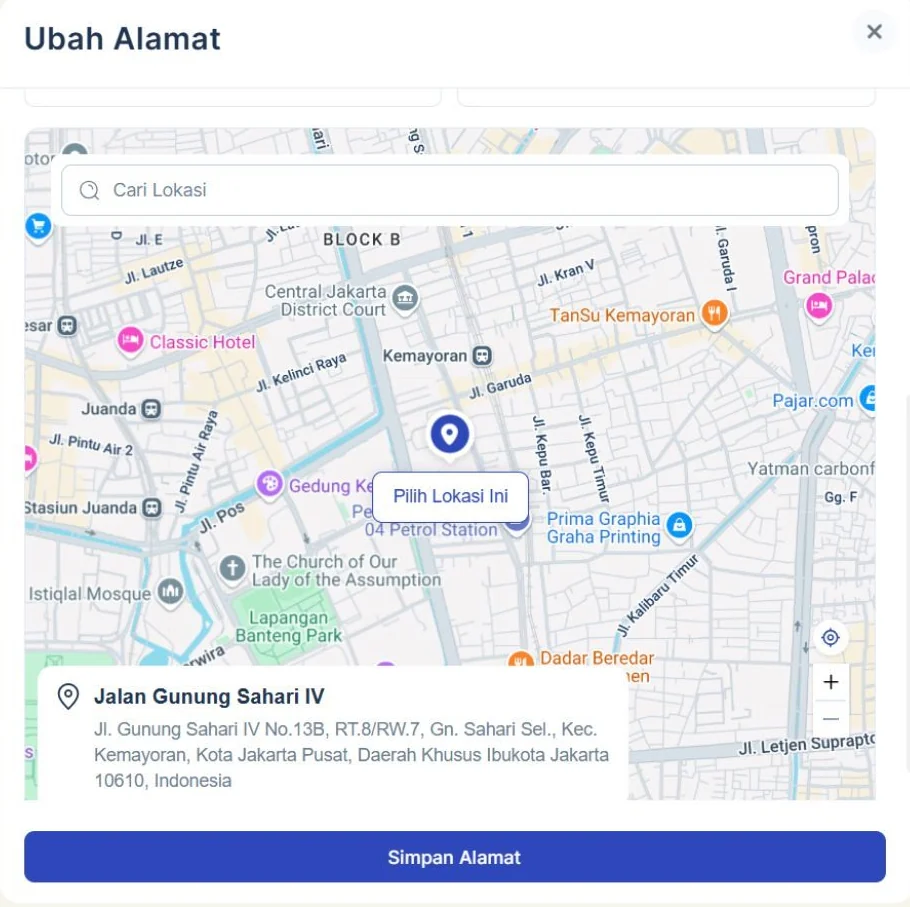
The map opens with "Cari Lokasi" (search location) on top. Sellers search for a street or landmark, move the pin to their exact door, and confirm with "Pilih Lokasi Ini" (choose this location). The pin goes exactly where the seller confirms it, not wherever the map happened to stop.
D4. Show the resolved address under the map
Below the map, the pin is translated back into a readable address ("Jalan Gunung Sahari IV, … Kota Jakarta Pusat"), so sellers can check that the pin matches the place they mean before saving.
D5. The pin fills the form, but the form stays
- Web: the address found from the pin updates the written address automatically, so sellers don't type it twice. Manual entry isn't removed: sellers can still type and correct details like RT/RW or an alley name.
- Mobile: the form and the pin are independent. Sellers can fill in the form, drop a pin, or both, and one doesn't overwrite the other (simpler on a small screen, where an auto-fill can quietly replace what someone typed).
D6. Ask for a pin at the moment it matters
On mobile, when a seller picks Lion Parcel and the pickup address has no pin, a pop-up recommends setting one:
- Continue with the current address, or
- Atur Pin Point (set a pin), which opens the map and returns them to their order
The same prompt appears when a seller switches to Lion Parcel, and on the confirmation page for imported orders that use Lion Parcel, where the seller has to confirm before continuing. It's a recommendation, not a block: no order gets stuck because of a missing pin.
D7. Location permission, handled
The map needs location permission first. Once it's granted, the map and pin follow the seller's current location. If they chose "Never Allow" and later tap Current Location, the permission request appears again, rather than the button silently doing nothing.
D8. One clear save
Simpan (save) stores the address and the pin together and returns to the address list.
Edge cases
| Case | Handling |
|---|---|
| Permission denied ("Never Allow") | Search still works, and tapping Current Location asks for permission again |
| Address without a pin | Tagged "Pinpoin belum diatur", and recommended when Lion Parcel is chosen |
| Several pickup addresses | Each one pinned on its own, with status on every card |
| Imported orders using Lion Parcel | Pin recommendation on the confirmation page, which must be confirmed |
| Slow connection | Map loads after the form, and the written address can still be saved |
Rollout
| Phase | When | What |
|---|---|---|
| Web | March 2025 | Pin on pickup addresses, designed in 3 days. A new Onboarding page shipped the same month to guide new sellers through address setup |
| Mobile app | Q3 2025 · shipped | Map in Create Order and My Addresses, pin status tags, permission handling, the Lion Parcel pin recommendation, and new-seller setup (to be confirmed) |
Impact
| Metric | Result |
|---|---|
| Sellers helped by pin-based pickup | 1,419 |
| Addresses couriers reached using an accurate pin | 1,942 |
| Failed pickups at pinned addresses vs unpinned | −27% |
| Average time from pickup request to collection | −35 min |
Pickups got more accurate on both sides: sellers and couriers stopped losing time to finding the right door.
Reflection
- Adoption is the real metric. A pin only helps if it exists. Asking during onboarding, and again when Lion Parcel is chosen, matters as much as the map itself.
- Three days forced the right scope. On web we only touched the address settings, and got pins in front of couriers fast. The broader version (Create Order, nudges) followed on mobile with real usage behind it.
- Auto-fill on web, independent on mobile was a deliberate difference. Next time, I'd test both on the same surface to settle which one sellers trust more.
- What I'd change: let couriers report a wrong pin, so a bad pin doesn't keep sending couriers to the wrong place.
KhoirulAuthor
Thanks for reading — happy to walk you through the decisions on a call.