



TL;DR
- Context. Mengantar lets sellers ship COD orders with many couriers from one dashboard. Couriers differ by area, and some can't deliver to a destination at all.
- Problem. Where couriers had no COD coverage, sellers either dropped COD, which their buyers expect, or lost the sale. Lion Parcel had the coverage, but a new courier has no delivery score on Mengantar yet, and sellers stick with the couriers they know.
- What I designed. Lion Parcel across the order journey: the courier selector, a "Recommended" state for a courier with no score yet, clear explanations for couriers that can't deliver, and the touchpoints after the order (tracking statuses, labels, history filters).
- Outcome. 95,000+ orders were created with Lion Parcel in its first ~2 months, giving sellers a COD option in areas their usual couriers didn't cover.
Context
Mengantar is a delivery aggregator for Cash on Delivery sellers, mostly small online businesses selling through social media and chat. The buyer pays the courier at the door, and Mengantar passes the money back to the seller's balance.
For these sellers, choosing a courier decides four things at once:
| Choice | What it affects |
|---|---|
| Price | The shipping fee the seller or buyer pays |
| COD availability | Whether the buyer can pay on delivery at all |
| Speed | How long the buyer waits, and how likely they are to cancel |
| Return risk | Failed COD deliveries come back to the seller at their cost |
Create Order is the busiest page in the product, at 203K visits a week in May 2025. Every courier change happens on the most-used screen.
Next to each courier, Mengantar shows a score (Skor) for the destination: a quick read of how well that courier performs there (based on delivery history).
The problem
Coverage gaps
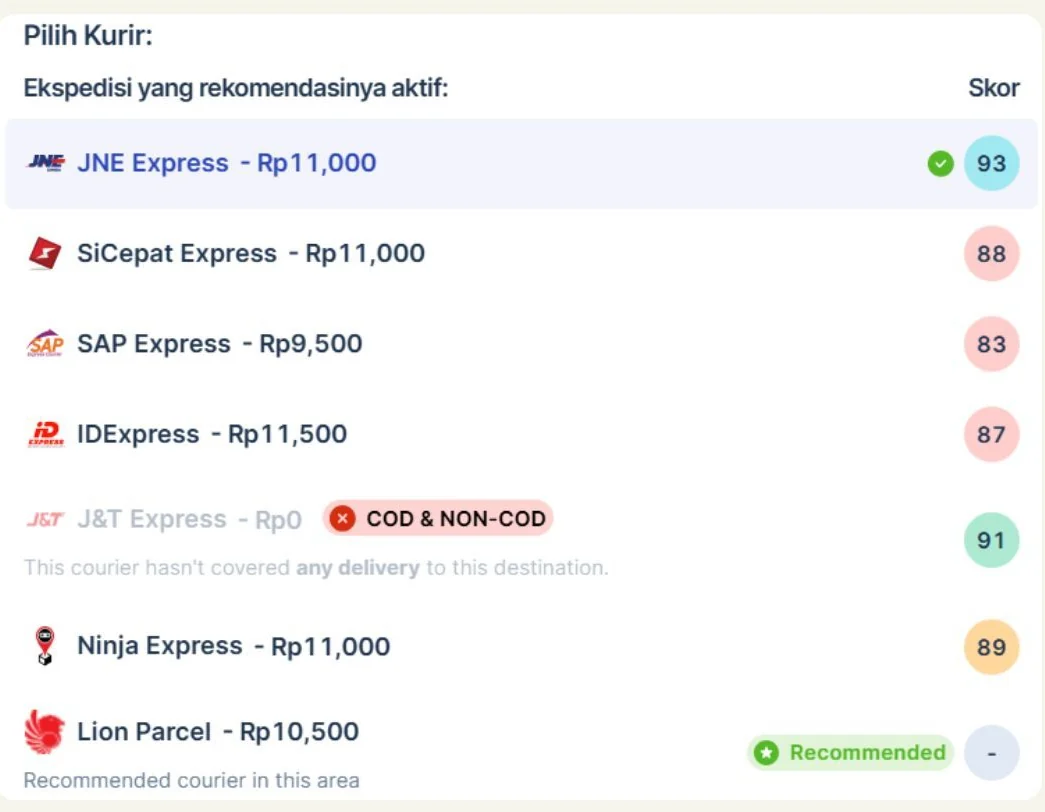
Not every courier delivers everywhere. In the courier list, a courier that can't reach the destination is greyed out: "This courier hasn't covered any delivery to this destination."
When that happened for the couriers a seller trusted, they had three bad options:
- Switch to non-COD. Buyers in many areas don't prepay, so the order often gets cancelled
- Pick a pricier or slower courier
- Ship outside Mengantar
In 18% of COD orders to outer-island destinations, sellers had two or fewer couriers available, and those orders were cancelled more often than average.
The cold-start problem
Lion Parcel brought wider COD coverage. But adding a courier to the list isn't enough:
- Its score is built from history, and a new courier has none. A blank or a 0 reads as "bad".
- Sellers default to the top-scored courier they know. The new option would be invisible exactly where it helps most.
How might we add a courier so sellers choose it confidently where it matters, without cluttering the choice everywhere else?
Users
| User | What they need from courier choice |
|---|---|
| Seller (owner) | The cheapest courier that will actually deliver COD to this buyer |
| Seller's admin / CS | To create many orders fast, without thinking about each courier's coverage |
| Mengantar ops and CS | Tracking and statuses that read the same for every courier |
Constraints
- Every courier's system is different: rates, COD rules, pickup, and status codes. Everything had to fit Mengantar's existing order and tracking model.
- Requirements from the courier side kept moving during the build, which the team flagged as a recurring challenge.
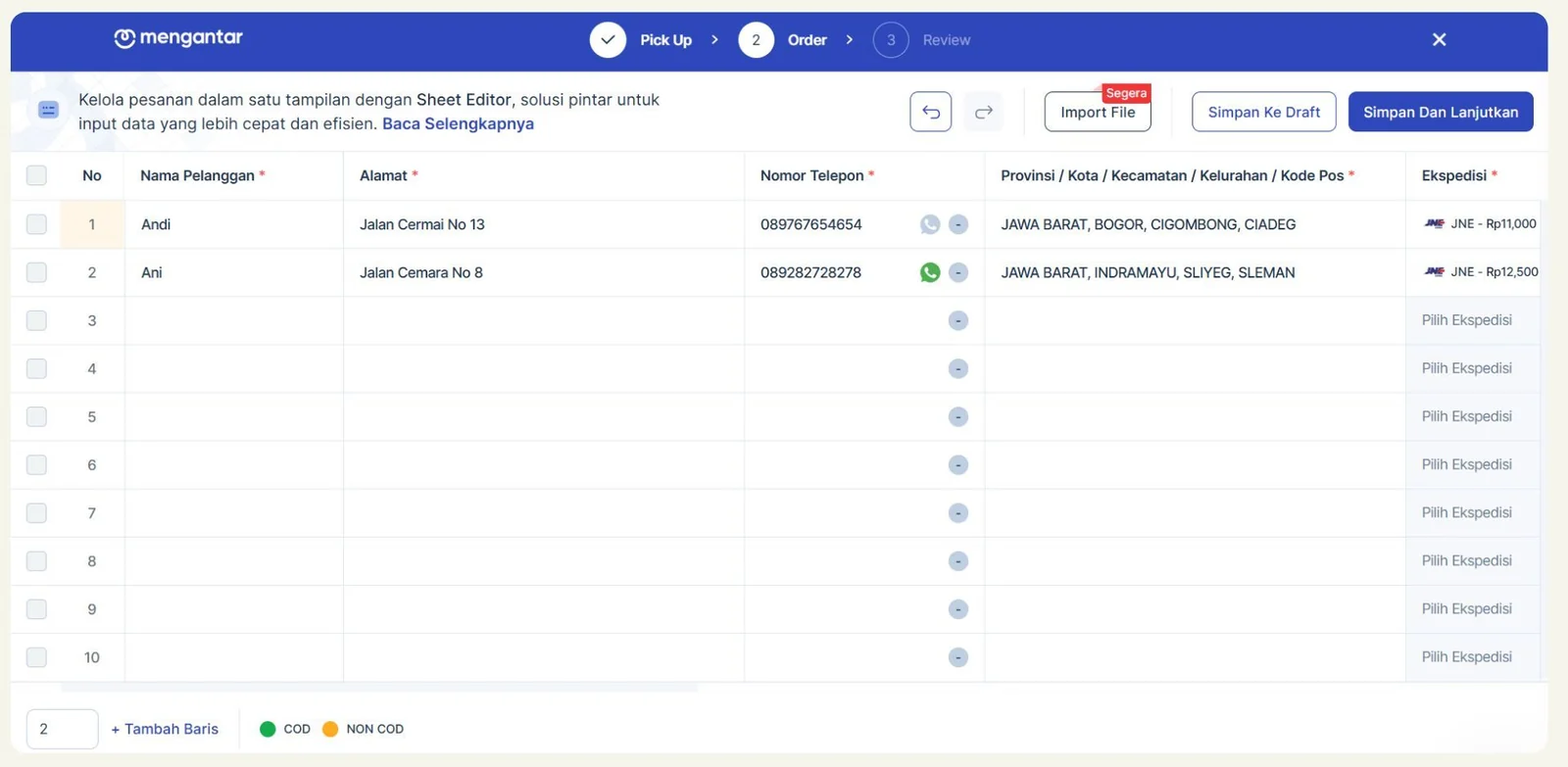
- Courier choice appears in many places: single orders, bulk orders and the Sheet Editor, the default courier in the top bar, and the filters in tracking and order history.
- No score data at launch.
Key design decisions
D1. Same place, same pattern
Lion Parcel is one more chip in Select Courier, next to JNE, SiCepat, SAP, IDexpress, J&T and Ninja. There's no separate flow and no entry point that only appears in a banner. Sellers find it where they already choose.

D2. "Recommended" instead of an empty score
Where Lion Parcel covers the destination, it shows:
- a green Recommended tag,
- the line "Recommended courier in this area",
- and "–" in the score column, not 0.
"–" means no data yet, and the tag means this is a good choice here. Together they tell sellers why an unfamiliar name is worth picking.
Trade-off: the recommendation is based on coverage, not delivery performance. Once Lion Parcel has enough deliveries in an area, it gets a normal score like every other courier (planned).
D3. Explain unavailable couriers instead of hiding them
A courier that can't deliver stays in the list, greyed out, with a "COD & NON-COD" tag and one sentence explaining why.
Hiding it would make sellers think the list was broken, or send them looking for their usual courier. Showing the reason explains the gap, and makes the value of the alternative obvious.
D4. Price beside the name, score at the edge
- "Lion Parcel – Rp10,500": name and price read as one unit, so sellers compare cost at a glance
- Colour-coded scores on the right, so sellers can scan quality without reading every number
- The selected courier is highlighted with a check
D5. Nothing changes after the order is created
Lion Parcel's own statuses were mapped onto Mengantar's existing ones (picked up, in transit, delivered, returned), so tracking, filters and reports read the same whatever the courier. Labels print through the same Print Label flow.
D6. Ask for a pickup pin when Lion Parcel needs it
Lion Parcel couriers had the most trouble with unclear pickup addresses. In the mobile app, choosing Lion Parcel for an address without a map pin brings up a recommendation to set one. Sellers can continue without it or set the pin and come back to their order. The same prompt appears when switching to Lion Parcel and for imported orders (see Geolocation pickup) (mobile, Q3 2025).
States
| State | What the seller sees |
|---|---|
| Available, recommended | Price + Recommended tag + "–" score |
| Available, scored | Price + colour-coded score |
| Selected | Highlighted row with a check |
| Not available | Greyed row, "COD & NON-COD" tag, reason |
| Rate unavailable | "Ongkir belum tersedia" (shipping rate not available yet) with a retry |
Rollout
- March 2025: released to all sellers as part of Team A's releases
- The pattern scaled: the next courier, Paxel, uses the same chip, list row and recommendation states. It's already in the selector.
Impact
| Metric | Result |
|---|---|
| Orders created with Lion Parcel | 95,000+ in its first ~2 months |
| Lion Parcel orders going to areas where another courier had no COD coverage | 38% |
| COD orders to low-coverage areas | +12% |
| Times the Recommended tag was chosen when shown | 31% |
Sellers got a wider choice of couriers, matched to the areas they actually ship to.
Reflection
- A new option needs a reason to be picked. The "Recommended" tag did more for adoption than the logo did.
- Write the status map first. Requirements from the courier side moved during the build. Settling the status mapping and edge cases (failed pickup, return, damaged parcel) earlier would have saved rework, and the next integration started there.
- What I'd change:
- Make the recommendation say why ("covers COD to this district") instead of the generic "in this area"
- Track how often the recommendation is accepted from day one, so the hand-off from "Recommended" to a real score is driven by data
KhoirulAuthor
Thanks for reading — happy to walk you through the decisions on a call.